jps services
  • Home Page
  • GIS Training Courses
    • QGIS Training Courses
    • ArcGIS Training Courses
    • MapInfo Pro Training Courses >
      • MapBasic Training Course
  • About
  • Blog

Creating a points layer in QGIS from data in degree format

9/8/2015

0 Comments

 
 If you have x and y co-ordinate information in a text file it is normally quite straight forward to convert that data into a points layer within a desktop GIS. Sometimes, you may also have data created with a GPS in degree format. This kind of data is not as straight forward to convert into a points layer as you have to ensure that the text file is in exactly the correct format. The following example shows how to import degree data into QGIS in a comma separated text file format.
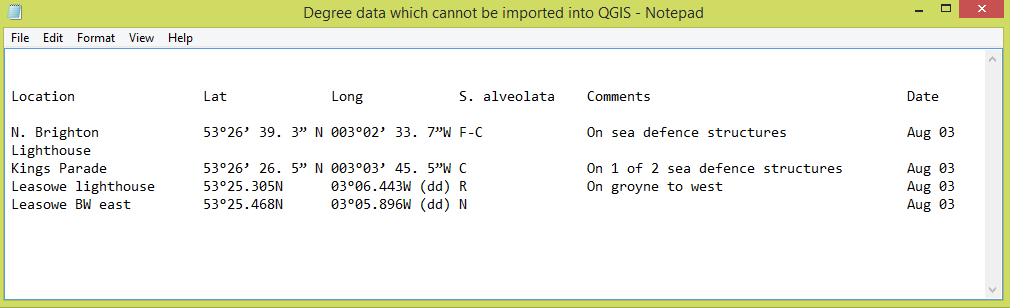
Degree data which needs to be formatted in order to be inported into QGIS
This degree information needs to be formatted in order for it to be imported into QGIS
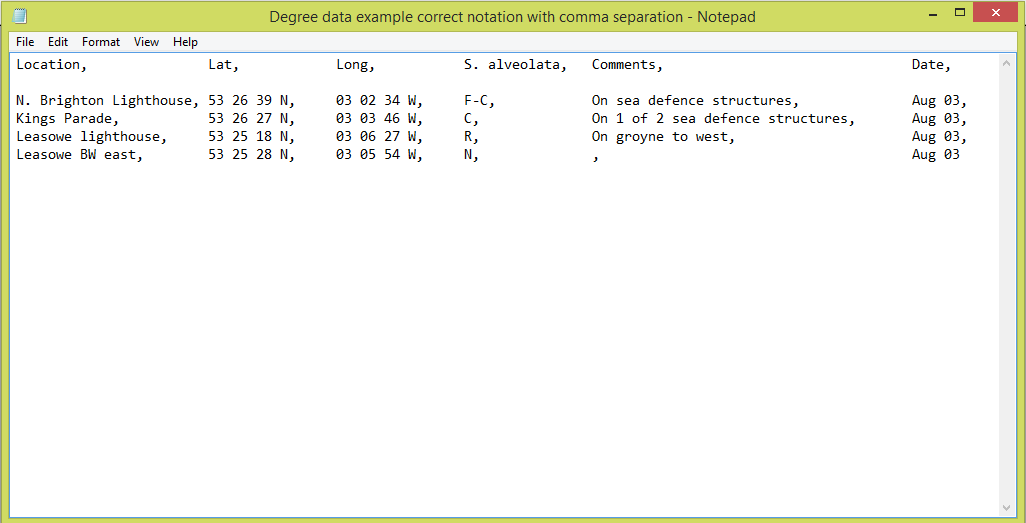
Degree data example showing correct notation
Comma separated text file showing degree notation for hours minutes and seconds
With QGIS, the first stage is to ensure that you have your information in the degree (DMS) format of Degrees, Minutes and Seconds. You may have your file in this format already and in this case you should be able to proceed to import it into QGIS. If the process fails completely or if you have your point layer not loading correctly there could be one of the following factors at play.

Read More
0 Comments

    Author

    Joe Short BSc has been involved with various mapping solutions for over twenty years.  If you are considering implementing a GIS  or have ArcGIS Pro, MapInfo Pro or QGIS training requirements, jps services would be happy to be of assistance to your organisation. 

    Archives

    May 2025
    March 2025
    March 2024
    October 2023
    September 2023
    August 2023
    March 2023
    April 2020
    March 2020
    October 2019
    September 2019
    August 2019
    July 2019
    March 2019
    November 2018
    October 2018
    August 2018
    July 2018
    November 2017
    October 2017
    September 2017
    July 2017
    February 2017
    January 2017
    December 2016
    November 2016
    October 2016
    May 2016
    February 2016
    September 2015
    August 2015
    April 2015
    February 2015
    November 2014
    October 2014
    July 2014
    June 2014
    May 2014
    March 2014
    February 2014
    December 2013
    November 2013
    October 2013
    September 2013
    August 2013
    June 2013
    May 2013
    April 2013
    February 2013
    December 2012
    October 2012
    September 2012
    August 2012
    July 2012

    Categories

    All
    Arc Gis
    Arcview
    Autodesk
    Cad
    Gis Training
    Local Government
    Mapbasic
    Mapinfo
    Quantum Gis
    Relational Databases
    Saga Gis

    RSS Feed