The Display Menu within QGIS is used for specifically creating map tips. A new feature now allows the creation of map tips using HTML code. You can use HTML to create a complex display when hovering the mouse over a feature.
From the top menu choose the View option and then from the drop down menu select the Map Tips option to enable it. Then double click on the layer in which you want to display your HTML code. When the Layers Property dialogue box appears click on the Display option on the left side of the dialogue box. In the Display option you can choose either the Field or HTML radio button. Enable the HTML radio button.
From the top menu choose the View option and then from the drop down menu select the Map Tips option to enable it. Then double click on the layer in which you want to display your HTML code. When the Layers Property dialogue box appears click on the Display option on the left side of the dialogue box. In the Display option you can choose either the Field or HTML radio button. Enable the HTML radio button.
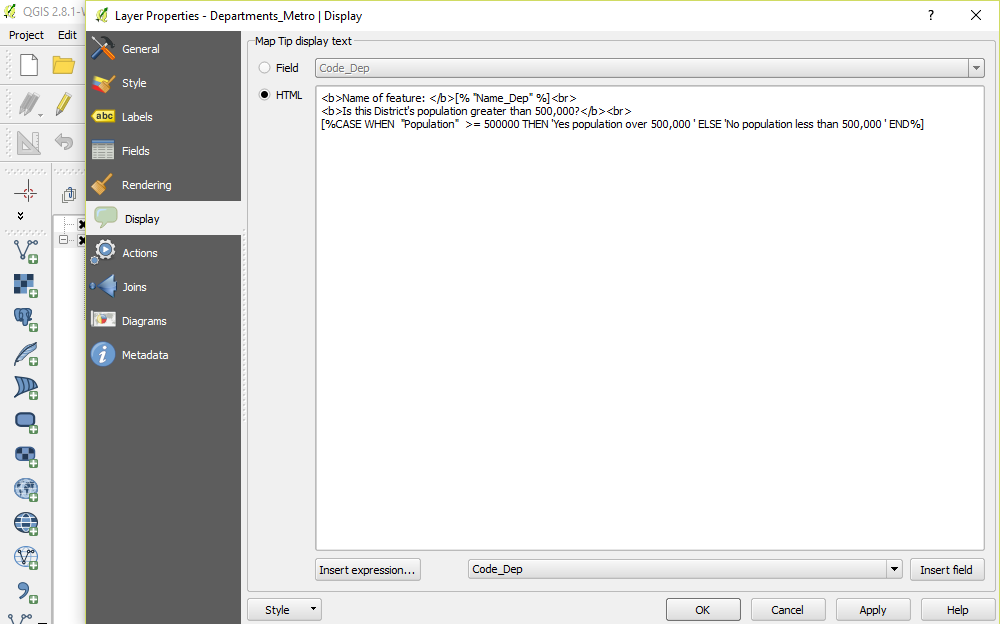
The following code is an example of how the HTML works:
<b>Name of feature: </b>[% "Name_Dep" %]<br>
<b>Is this District's population greater than 500,000?</b><br>
[%CASE WHEN "Population" >= 500000 THEN 'Yes population over 500,000 ' ELSE 'No population less than 500,000 ' END%]
<b>Name of feature: </b>[% "Name_Dep" %]<br>
<b>Is this District's population greater than 500,000?</b><br>
[%CASE WHEN "Population" >= 500000 THEN 'Yes population over 500,000 ' ELSE 'No population less than 500,000 ' END%]
The <b> ….</b> elements will bold any text within the code. Here Name of Feature will be in bold text. The feature which you wish to have displayed appears in square brackets with % on either side of the feature. The feature from the Attribute Table is also contained with double quotation marks. The <br> HTML code creates a new line.
The CASE WHEN ELSE code enables you to make evaluations such as less than, equal to or more than for example. Obviously, there are many uses for this kind of code. You can either type code directly into the Display option box or you can use the Insert expression... and Insert Field boxes at the bottom of the option box to create your code.
The CASE WHEN ELSE code enables you to make evaluations such as less than, equal to or more than for example. Obviously, there are many uses for this kind of code. You can either type code directly into the Display option box or you can use the Insert expression... and Insert Field boxes at the bottom of the option box to create your code.
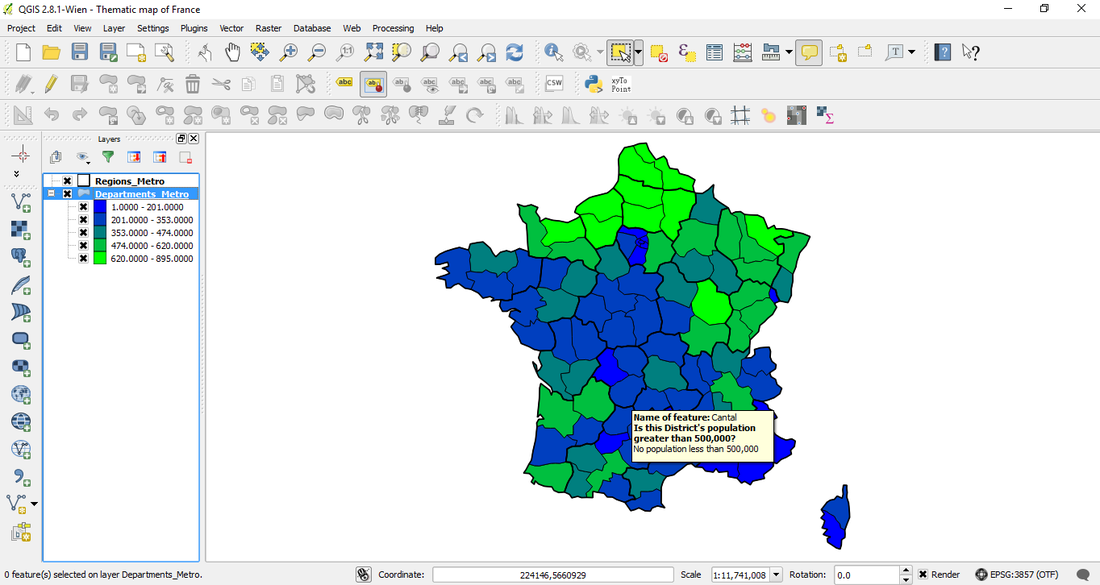
In the above example hovering the mouse over the map will display the text in bold with features of the case options in normal text.
 RSS Feed